
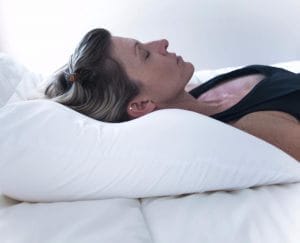
The Nitetronic Nitelink app is a companion tool for the Nitetronic anti-snore pillow that tracks snoring and head position, offering useful data but also showing some limitations in design and reliability.
If you already use the Nitetronic pillow and like to monitor your sleep metrics, the app can add value, but it is not as polished or feature-rich as many mainstream sleep tracking apps.
What the Nitetronic Nitelink App Does
The Nitetronic Nitelink app connects to the Nitetronic anti-snore pillow to record snoring activity and head position throughout the night.
Its main purpose is to show whether the pillow is helping reduce snoring over time and to visualize when and how often snoring occurs.
The app focuses on snoring rather than full sleep staging, so it is not a replacement for comprehensive sleep tracking or a medical sleep study.
Instead, it serves as a specialized tool to help you understand patterns related to snoring and how they may change with continued use of the pillow.
How the App Works With the Nitetronic Pillow
The Nitetronic pillow detects snoring and gently adjusts head position in an effort to reduce airway obstruction.
The Nitelink app receives data from the pillow, logs it, and displays graphs and statistics that show snoring intensity and timing across the night.
This connection between the hardware and software allows you to see not only if snoring occurs, but also how the pillow responds.
Over multiple nights, the app can help you determine trends such as whether snoring is decreasing, shifting in time, or associated with particular positions.
Setup and Connectivity
Setting up the Nitelink app typically involves downloading it to your smartphone, pairing it with the Nitetronic pillow, and ensuring Bluetooth connectivity is active before bedtime.
The process is straightforward for most users, though it may feel slightly technical for those who are not accustomed to pairing devices or managing app permissions.
Keeping the phone within a reasonable distance of the pillow during the night is important to help maintain a stable connection.
When connectivity is stable, data collection tends to be smooth, but interruptions can lead to incomplete or fragmented nightly reports.
Design and Ease of Use
The app’s interface is functional and generally understandable, but it lacks the polished look and intuitive navigation of leading consumer sleep apps.
Basic information such as nightly snore duration and timing is accessible, yet some screens and options could be more logically organized for faster access.
Users who are comfortable with simple charts and menus should have little trouble finding their way around the app after a few nights of use.
However, those expecting a highly modern, richly interactive interface may find the layout somewhat dated or less user-friendly than expected.
Data, Metrics, and Accuracy
The Nitelink app records snoring events, duration, and patterns over the course of the night, often presenting them as graphs and summary statistics.
This can be particularly helpful for identifying clusters of snoring, such as periods where snoring spikes in the early morning or when sleeping in certain positions.
The app also tracks head position, which helps you see how often you are on your back or side and whether certain positions coincide with louder or more frequent snoring.
While the app offers useful trend information, the data should be considered an approximation rather than a precise medical measurement of snoring intensity or sleep quality.
For many users, the most valuable aspect is not the exact number of snore events, but the overall trend showing whether snoring is becoming more or less frequent over weeks or months.
This longer-term perspective can be especially useful if you are experimenting with changes such as weight loss, reduced alcohol intake, or different sleep positions.
Reliability and Limitations
The Nitelink app’s usefulness depends heavily on consistent connectivity and reliable data capture each night.
If the connection between the phone and pillow is lost, the app may miss parts of the night, resulting in gaps that make it harder to assess true snoring patterns.
Some users may experience occasional glitches, such as the app failing to start recording or showing incomplete graphs the next morning.
While these issues are usually more of an annoyance than a complete barrier to use, they can reduce confidence in the recorded data if they happen frequently.
Using the Data for Practical Changes
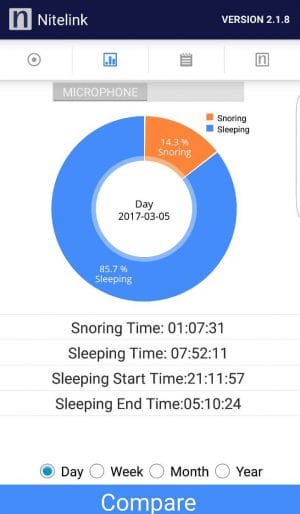
One of the main strengths of the Nitelink app is the way it can help you link your behavior and sleep environment to changes in snoring.
By reviewing several nights of data, you may notice that snoring increases after drinking alcohol late in the evening or when sleeping flat on your back.
Armed with that information, you can experiment with adjustments such as elevating your head, modifying bedtime routines, or changing sleep positions to see if the graphs improve.
For users who like to quantify health changes, the app offers an objective record of progress that can be more motivating than relying solely on subjective impressions.
Comparison With General Sleep Tracking Apps
Compared to general sleep tracking apps that use a phone microphone or wearable device, the Nitelink app is more narrowly focused on snoring and head position.
It does not attempt to estimate sleep stages, total sleep time, or sleep efficiency in the detailed way some multi-sensor systems do.
However, because it is integrated directly with a specialized anti-snore pillow, the data it provides is more tightly linked to the specific intervention you are using.
This can make it more relevant if your primary goal is simply to reduce disruptive snoring rather than to optimize every aspect of sleep architecture.
Pros
- Works directly with the Nitetronic anti-snore pillow to track snoring and head position over time.
- Provides graphs and statistics that help you see whether snoring is improving, worsening, or staying the same.
- Can highlight patterns related to position or time of night, supporting more informed adjustments to your sleep routine.
- Offers a simple way to monitor the effectiveness of the pillow beyond subjective impressions alone.
Cons
- The interface is functional but not as polished or intuitive as many modern sleep tracking apps.
- Occasional connectivity or reliability issues can lead to incomplete records and reduce trust in the data.
- The app focuses on snoring and position and does not provide detailed information on sleep stages or overall sleep quality.
- Users expecting a highly feature-rich, all-in-one sleep platform may find the app’s scope more limited than they would like.
Who Should Consider the Nitelink App
The Nitelink app is most appropriate for people who already use or plan to use the Nitetronic anti-snore pillow and want objective feedback on how well it is working.
It can also be a good fit for users who enjoy tracking data and viewing trends, especially when making lifestyle changes that may affect snoring.
If you are looking for a standalone snoring solution without hardware, or if you primarily want a broad sleep analytics platform, this app by itself may not be the best match.
In those cases, a different combination of anti-snoring devices and general-purpose sleep tracking tools might be more appropriate.
Final Thoughts
The Nitetronic Nitelink app adds meaningful value for users of the Nitetronic anti-snore pillow by recording snoring and head position, then presenting that information in a clear if somewhat basic way.
Its strengths lie in trend monitoring and pattern recognition, while its weaknesses include a modest interface and occasional reliability issues.
If you are committed to using the Nitetronic pillow and appreciate data-driven feedback, the app can help you better understand and refine your approach to reducing snoring.
However, if you expect a fully featured, visually rich sleep analytics platform, you may find the Nitelink app more utilitarian than impressive. There are other pillow possibilities here.