
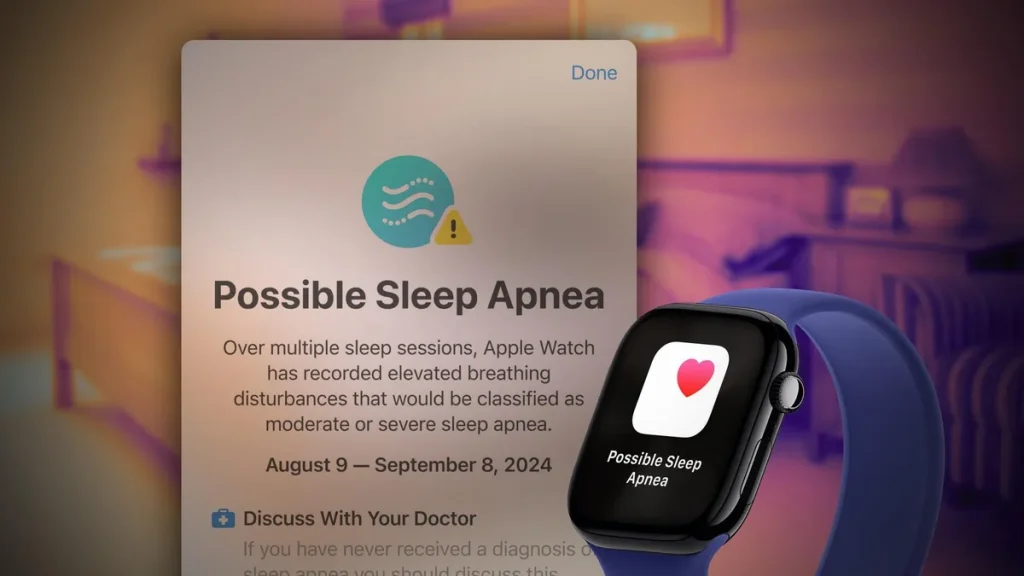
If you’ve landed on this page, you’re probably asking a critical question: Can my Apple Watch actually detect sleep apnea?
You may have found older articles from 2024 or even 2025 that are hopeful but inconclusive. The technology has evolved dramatically. As we move through 2025, the answer is becoming clearer, more nuanced, and more powerful than ever before.
Here at SleepingZones.com, we cut through the hype to give you evidence-based, expert-reviewed information. This guide will provide everything you need to know about using an Apple Watch for sleep apnea awareness, including what it can do today, its exciting future potential, and the crucial limitations you must understand.
Short Answer? It’s a Powerful Screening Tool, Not a Diagnosis Device.
No, your Apple Watch cannot diagnose sleep apnea. A formal diagnosis still requires a clinical sleep study (polysomnogram). However, yes, the latest Apple Watch models (Series 9, Ultra 2, and beyond) are exceptionally good at identifying the warning signs and high risk of sleep apnea, prompting you to seek professional medical help.
How the Modern Apple Watch Tracks Your Sleep for Apnea Clues
The Apple Watch has transformed from a simple sleep tracker into a sophisticated health sensor. It uses a combination of hardware and advanced algorithms to paint a picture of your night.
- Blood Oxygen Sensing (SpO2): This is the most significant feature for sleep apnea detection. Using red and infrared light sensors on its back, the watch measures the oxygen saturation in your blood throughout the night. During a sleep apnea event, your airway becomes blocked, causing your blood oxygen levels to drop repeatedly (called desaturations). The watch logs these dips.
- Advanced Sleep Staging (via Accelerometer and Gyroscope): The watch tracks your movement to accurately identify when you are in REM, Core, or Deep sleep. People with sleep apnea often have disrupted sleep architecture—they may struggle to reach deep sleep or have micro-awakenings they don’t even remember.
- Heart Rate Monitoring (Photoplethysmogram or PPG): Your heart rate can spike during an apnea event as your body struggles to breathe. The watch tracks your heart rate variability (HRV) and resting heart rate, which can be elevated due to the stress of apnea events.
- Respiratory Rate: By analyzing minute chest movements, the watch estimates your breaths per minute. Erratic breathing or pauses can be a key indicator.
The magic isn’t in one data point, but in the fusion of all this data by Apple’s algorithms to look for patterns consistent with sleep-disordered breathing.
What to Look For in Your Apple Health Data (2025 Edition)
You don’t need to be a data scientist. Here’s how to check your own data for potential red flags:
- Open the Health App on your iPhone.
- Tap Browse > Respiratory > Blood Oxygen. Scroll down and view the data while in Sleep Mode. Do you see frequent, significant dips below 90%? (Note: An occasional small dip is normal, but consistent, large dips are not).
- Go to Browse > Sleep. Scroll to the bottom and tap “Show More Sleep Data.” Check your Sleep Consistency and the amount of Deep Sleep/REM you’re getting. Consistently low deep sleep can be a sign.
- Check Browse > Heart > Heart Rate Variability (HRV). A consistently low HRV can indicate your nervous system is under stress, potentially from fighting to breathe at night.
Sleeping Zones Pro Tip: Don’t panic over a single bad night. Look for consistent patterns over at least two weeks. Context matters—a night of drinking alcohol or being sick can skew data.
The Game-Changer: FDA-Cleared Apps and The Future is Now
This is where the 2025 landscape truly separates from those outdated 2017 articles. The Apple Watch’s hardware is now being leveraged by third-party apps that have received FDA clearance as medical devices for sleep apnea screening.
These apps use the sensors in your watch to run a targeted sleep study from your home.
- How it Works: You download an app like SleepImage or Clevy Sleep. You wear your watch to bed as usual. The app uses the watch’s sensors to collect a night’s worth of cardiopulmonary data.
- The Result: The app provides a detailed report and a risk assessment for sleep apnea (low, medium, or high risk). This report is designed to be shared with your doctor to help determine if a full sleep study is necessary.
This is the critical bridge between casual tracking and clinical action. It legitimizes the data and provides a structured pathway to a diagnosis.
Current Limitations & The Non-Negotiable Truths
- It’s a Screening Tool, Not a Diagnostic: This cannot be overstated. The watch provides data that suggests risk. Only a sleep study can count the number of events per hour (AHI score) and provide a formal diagnosis.
- Not All Watches Are Created Equal: Blood Oxygen sensing is a key component. This feature is available on Apple Watch Series 6 and later. If you have an earlier model, your watch can track sleep duration and heart rate but cannot screen for apnea effectively.
- Accuracy Varies: Factors like a loose band, tattoos, or skin perfusion can affect sensor accuracy. Clinical-grade sleep study equipment is far more precise and comprehensive, measuring brain waves, eye movement, and muscle activity that a watch simply cannot.
Our Verdict & Action Plan for 2025
The Apple Watch has evolved into one of the most powerful proactive health tools available to consumers. For sleep apnea, it serves as an incredible early warning system.
If your Apple Watch data shows consistent warning signs (low SpO2, poor sleep architecture), here is your action plan:
- Don’t Self-Diagnose: Use the data as motivation, not a conclusion.
- Consider an FDA-Cleared App: For a more structured assessment, use an app like SleepImage to generate a shareable report. This adds significant weight to your concerns.
- Talk to Your Doctor: This is the most important step. Bring your data (screenshots from the Health app or a report from an FDA-cleared app) to your physician. Say, “My wearable has consistently recorded these patterns, and I’m concerned about sleep apnea.”
- Push for a Sleep Study: Based on your data and symptoms (e.g., loud snoring, daytime fatigue, waking up gasping), your doctor can order a home sleep test or an in-lab polysomnogram to get a definitive answer.
The Future: What’s Next for Apple Watch and Sleep Health?
The trajectory is clear. With rumors of new sensors (like blood glucose monitoring or advanced sleep staging with temperature sensing already in Watch Series 8 and later), the Apple Watch is poised to become even more integrated into personal health management.
We anticipate:
- Tighter integration with healthcare systems, allowing doctors to view patient-generated Apple Watch data seamlessly.
- More FDA clearances directly from Apple for built-in health features.
- AI-driven personalized insights that not only identify problems but suggest behavioral changes to improve sleep quality.
Read Also: Sleep Apnea Reasons: The 2025 Guide to Root Causes, Risk Factors, and Emerging Science
Frequently Asked Questions (FAQ)
Q: Which Apple Watch is best for sleep apnea screening in 2025?
A: The Apple Watch Series 9, Ultra 2, or later models are ideal as they contain the most advanced sensors and algorithms. At a minimum, you need a Series 6, 7, or 8 for Blood Oxygen sensing.
Q: I have an older Apple Watch without SpO2. Is it useless?
A: It can still track your sleep duration and heart rate, which can show indirect signs of poor sleep. However, for apnea screening, the Blood Oxygen sensor is critical, so its utility is limited.
Q: Are the FDA-cleared apps worth the cost?
A: If you have strong reason to believe you have sleep apnea and want to provide your doctor with clinical-grade data, they are an excellent and cost-effective intermediate step before a full sleep study.
Q: Has Apple announced a native sleep apnea feature?
A: As of early 2025, there is no native “Sleep Apnea Detection” feature within watchOS. However, given the company’s focus on health and the capabilities of the hardware, it is a highly anticipated and likely future development. We at Sleeping Zones will update this article the moment it happens.
Conclusion: Empower Yourself, Then See a Professional
The days of wondering if your snoring is “normal” are over. Your Apple Watch provides a window into your sleep health that was once available only in a lab. Use this technology wisely. Let it empower you to have a data-driven conversation with your doctor.
Your journey to better sleep and better health doesn’t start with a diagnosis—it starts with awareness. And in 2025, that awareness is on your wrist.
Disclaimer: This article is for informational purposes only and does not constitute medical advice. The Apple Watch is not a medical device for diagnosis. Always consult with a qualified healthcare professional for any health concerns or before making medical decisions.